

In today’s digital landscape, harnessing AI for graphic design has become a game-changer for creatives and businesses alike. As technology advances rapidly, designers are turning to intelligent algorithms to streamline workflows, spark fresh ideas, and maintain brand consistency across multiple channels. Currently, the integration of AI for graphic design is not just a trend—it’s a necessity for teams aiming to stay competitive and innovative this year (2026). Whether you are experimenting with generative art models or automating routine tasks like resizing and background removal, understanding how to leverage AI effectively can empower you to focus on higher-level strategy, storytelling, and visual impact.
This article provides a comprehensive guide to help you unlock the full potential of AI for graphic design. You’ll learn the core principles behind these intelligent tools, discover the key advantages they offer, and explore leading platforms that are shaping the creative industry. We’ll also share practical tips for integrating AI into your workflow, detail methods for preserving human creativity alongside machine efficiency, and illustrate best practices through real-world examples. By the end of this post, you’ll have a clear roadmap to adopt AI responsibly, maximize productivity, and elevate the quality of your visual assets. Ready to embark on a journey where code meets canvas? Let’s dive in and explore how AI for graphic design is redefining the creative process today.
Understanding AI for Graphic Design
At its core, AI for graphic design refers to a suite of technologies—such as machine learning, computer vision, and natural language processing—that analyze input data, recognize visual patterns, and generate outputs tailored to human criteria. These systems learn from massive datasets, including images, typography styles, and user interactions, enabling them to suggest layouts, color schemes, and even fully realized graphics based on simple prompts. By integrating AI into your design toolbox, you can accelerate ideation and execution in ways that were previously impossible.
For example, generative adversarial networks (GANs) can produce novel imagery by pitting two neural networks against each other, while style transfer models apply the aesthetics of famous paintings to your own photos. Computer vision APIs can automatically detect objects, making it effortless to mask backgrounds or classify assets for your content library. Natural language interfaces now allow you to describe a scene—“bright summer beach poster with bold sans serif text”—and watch as an AI engine crafts draft visuals in seconds.
These capabilities transform repetitive tasks like batch resizing, exporting multiple formats, or enforcing brand guidelines into automated processes. Designers reclaim time otherwise spent on manual edits, freeing them to refine narratives and explore more experimental layouts. However, it remains critical to understand the limitations of AI outputs. Algorithms may struggle with cultural nuances or contextual subtleties, so human oversight is essential to ensure that the final designs resonate emotionally and align with brand values.
Institutions such as MIT and organizations like the National Science Foundation continue to research and advance these models, pushing the boundaries of what AI can achieve in creative domains. By grasping both the promises and pitfalls of AI for graphic design, you can make smarter decisions when choosing tools and orchestrating your design process today.
Key Benefits of AI-Driven Design Tools
 Integrating AI for graphic design offers a multitude of advantages that span speed, creativity, and scalability. One of the most immediate benefits is a dramatic increase in efficiency. Automated features like background removal, batch resizing, and export optimization allow teams to complete tasks in seconds rather than hours. This acceleration translates to faster turnaround times, enabling you to meet tight deadlines without sacrificing quality.
Beyond efficiency, AI enhances creative exploration. Recommendation engines can suggest complementary color palettes, typography pairings, and layout variations based on design best practices. When you encounter a creative block, these AI-driven suggestions provide a fresh starting point, helping you to iterate rapidly and discover unexpected visual directions. Generative models, such as those powering Midjourney or Stable Diffusion, even allow you to generate mood boards and concept art from textual prompts, fueling your imagination with minimal effort.
Consistency and brand alignment also improve significantly when you leverage AI. Custom style guides embedded into your AI tools enforce specific color values, logo placements, and font usages, reducing human errors and ensuring cohesive visuals across campaigns. For organizations managing multiple channels and geographic markets, this consistency builds stronger brand recognition and trust.
Scalability is another key advantage. With generative templates, you can produce hundreds of personalized graphics—be it for email campaigns, social media ads, or print collateral—while maintaining a unified aesthetic. Teams can deliver localized or audience-specific variations without multiplying the manual workload. In turn, this level of customization drives higher engagement and conversion rates.
Finally, the cost savings achieved through AI automation are substantial. By offloading repetitive tasks to AI, you reduce the need for extended human labor on mundane processes. This frees your design team to focus on strategic challenges and high-value creative work, ultimately lowering production costs and increasing return on investment. In today’s competitive market, these combined benefits of AI for graphic design have become essential for sustainable growth.
Top Tools for AI-Powered Graphic Design
 The ecosystem of AI tools for graphic design continues to expand rapidly, offering solutions for every stage of the creative process. Below are some of the most impactful platforms you can explore today.
1. Adobe Sensei
Adobe Sensei is embedded across Creative Cloud apps like Photoshop, Illustrator, and InDesign. It leverages deep learning to deliver features such as Content-Aware Fill, auto-tagging for image libraries, and layout suggestions that conform to established design principles. By analyzing user interactions, Sensei adapts over time, making your workflows progressively more efficient.
2. Canva Magic Resize & Text to Image
Canva’s AI modules enable instant adjustments for multiple social platforms through Magic Resize and transform simple text prompts into custom illustrations. Its intuitive interface makes AI-powered design accessible for non-experts, accelerating marketing outputs for small businesses and agencies.
3. Figma Plugins
Community-driven plugins for Figma—such as Autoname and Pixel Perfect—automate layer naming, alignment, and design token generation for developer handoff. These extensions reduce manual hassles, ensuring pixel-accurate outputs and speeding up collaboration between designers and engineers.
4. Generative Engines: Midjourney & Stable Diffusion
Generative art platforms like Midjourney and Stable Diffusion excel at converting descriptive text into high-resolution images. They are ideal for creating concept art, unique backgrounds, and inspirational mood boards. You can fine-tune prompts to guide the style, color, and composition according to project needs.
5. Remove.bg & AutoClipping.ai
Dedicated background removal tools deliver pixel-perfect cutouts in seconds, streamlining e-commerce photography and product catalog design. They integrate easily with popular design suites, eliminating the need for painstaking manual masking.
6. VistaCreate DesignScape
DesignScape by VistaCreate analyzes user inputs—such as target audience and brand colors—to recommend layouts and palettes. This accelerates the early stages of ideation, enabling teams to lock in a visual direction swiftly.
Each of these solutions addresses specific pain points, so evaluate which features align best with your project goals and team skill sets. By combining multiple tools, you can assemble a powerful AI-enhanced workflow that covers ideation through final delivery.
Integrating AI into Your Design Workflow
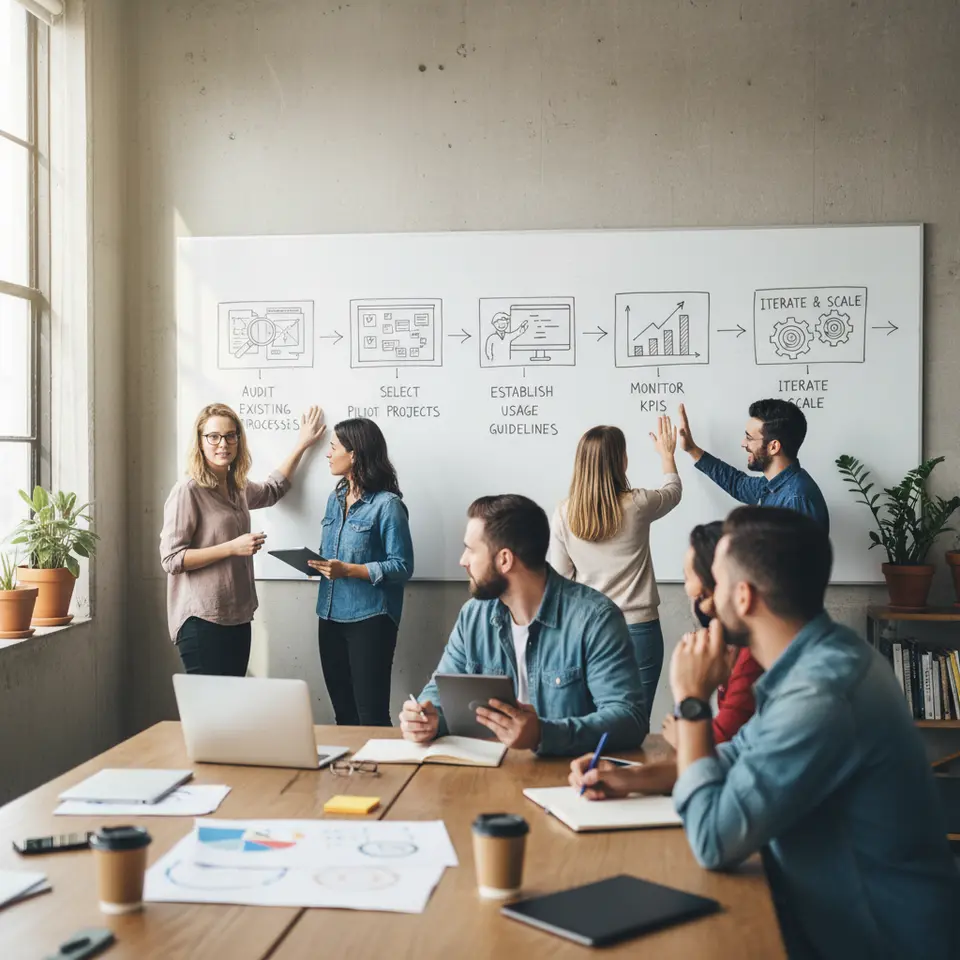 Adopting AI for graphic design requires more than simply installing the latest plugin. A strategic implementation plan ensures a smooth transition and maximizes the return on your technology investment. Below is a step-by-step roadmap you can follow today.
Audit Existing Processes
Begin by mapping out current workflows to identify repetitive tasks—such as asset resizing, file format conversions, and template creation—that are prime candidates for automation. Understanding where you spend the most time allows you to target high-impact areas first.
Select Pilot Projects
Choose low-risk assignments—social media posts, internal presentations, or marketing banners—to experiment with AI tools. This controlled environment helps you evaluate performance without jeopardizing critical deliverables.
Train Your Team
Host hands-on workshops or virtual tutorials demonstrating AI features, best practices, and creative possibilities. Encourage exploration by assigning mini-challenges, such as generating themed social media graphics using AI prompts.
Establish Usage Guidelines
Document when to rely on AI suggestions versus manual intervention. Define quality checkpoints to ensure alignment with brand standards and to catch any quirks in AI outputs.
Monitor KPIs
Track metrics such as project turnaround time, revision counts, and client satisfaction scores. Measuring these indicators helps you quantify improvements and refine your approach.
Iterate and Scale
Based on pilot results, adjust tool configurations, update guidelines, and expand AI adoption across teams. Gradual scaling ensures minimal disruption and continuous improvement.
With a structured plan, integrating AI for graphic design becomes a sustainable evolution rather than a disruptive overhaul. As you refine your processes, you’ll unlock greater efficiency, consistency, and creative freedom across all your visual projects.
Balancing AI and Human Creativity
While AI enhances speed and automates technical tasks, the essence of memorable design lies in human insight, emotion, and cultural context. Striking the right balance ensures that your visuals remain authentic and resonate deeply with audiences.
Use AI as a Co-Pilot
Treat AI outputs as initial drafts or exploratory options, not final deliverables. Leverage machine suggestions to generate multiple variations quickly, then apply your unique judgment and taste to select and refine the strongest concepts.
Customize Generated Content
Always tweak AI-produced elements—adjust colors, refine typography, or combine AI art with hand-drawn illustrations. This hybrid approach preserves the distinctiveness of your brand while benefiting from algorithmic speed.
Develop a Signature Style
Train custom models on your archive of past work or create brand-specific presets. By feeding your unique visual language into AI systems, you ensure that generated assets align more closely with your identity.
Foster Collaborative Brainstorming
Combine AI-driven ideation sessions with group critiques and sketching workshops. This fusion of algorithmic suggestions and diverse human perspectives sparks richer, more innovative outcomes.
Maintain Ethical Standards
Be transparent about AI usage and verify that generated content respects copyright laws and cultural sensitivities. Ethical oversight safeguards your reputation and builds trust with clients and audiences.
By consciously blending the strengths of AI with human creativity, you ensure that your designs remain both efficient and emotionally resonant, delivering outstanding results in today’s dynamic marketplace.
FAQ
Can AI tools replace human graphic designers?
AI excels at automating repetitive tasks and generating rapid design drafts, but it cannot replicate human creativity, empathy, and deep cultural insight. Use AI as a co-pilot—allowing it to handle technical chores while you guide the vision and inject emotional resonance.
How do I maintain brand consistency when using multiple AI platforms?
Establish clear usage guidelines and embed custom style presets—such as specific color values, typography, and logo placements—into your AI tools. Regularly audit outputs against your brand standards to catch deviations early.
What metrics should I track to measure AI’s impact on my design workflow?
Monitor KPIs like project turnaround time, number of revisions, and stakeholder satisfaction scores. Compare these metrics before and after AI adoption to quantify efficiency gains and identify areas for improvement.
Are there ethical considerations when using AI-generated content?
Yes. Always verify that AI outputs respect copyright laws, avoid biased or culturally insensitive imagery, and disclose AI usage when appropriate. Ethical oversight protects your brand reputation and fosters audience trust.
Conclusion
Embracing AI for graphic design offers a transformative opportunity to accelerate workflows, amplify creativity, and maintain brand consistency across diverse channels. In this year (2026), the most successful teams leverage AI as a co-pilot—automating routine tasks while preserving the emotional depth and cultural nuance that only human designers can provide. By understanding foundational AI concepts, exploring leading tools, and following a structured integration roadmap, you can enhance productivity and unlock new creative horizons. Remember to establish clear guidelines, monitor performance metrics, and iterate responsibly to sustain long-term success. As AI technology continues to evolve, your adaptability and commitment to ethical design practices will ensure that you remain at the forefront of the graphic design industry in today’s digital landscape.
Read more about this topic: Graphic Design and Visual Communication Guide



Leave a Reply